

# Welcome

Welcome to the Carbon Central knowledge base

## What is Carbon Central?

Carbon Central provides an industry leading solution to centrally manage carbon projects, whether they be carbon reporting, carbon tokenisation, or guarantee of origin of green fuels and resources.

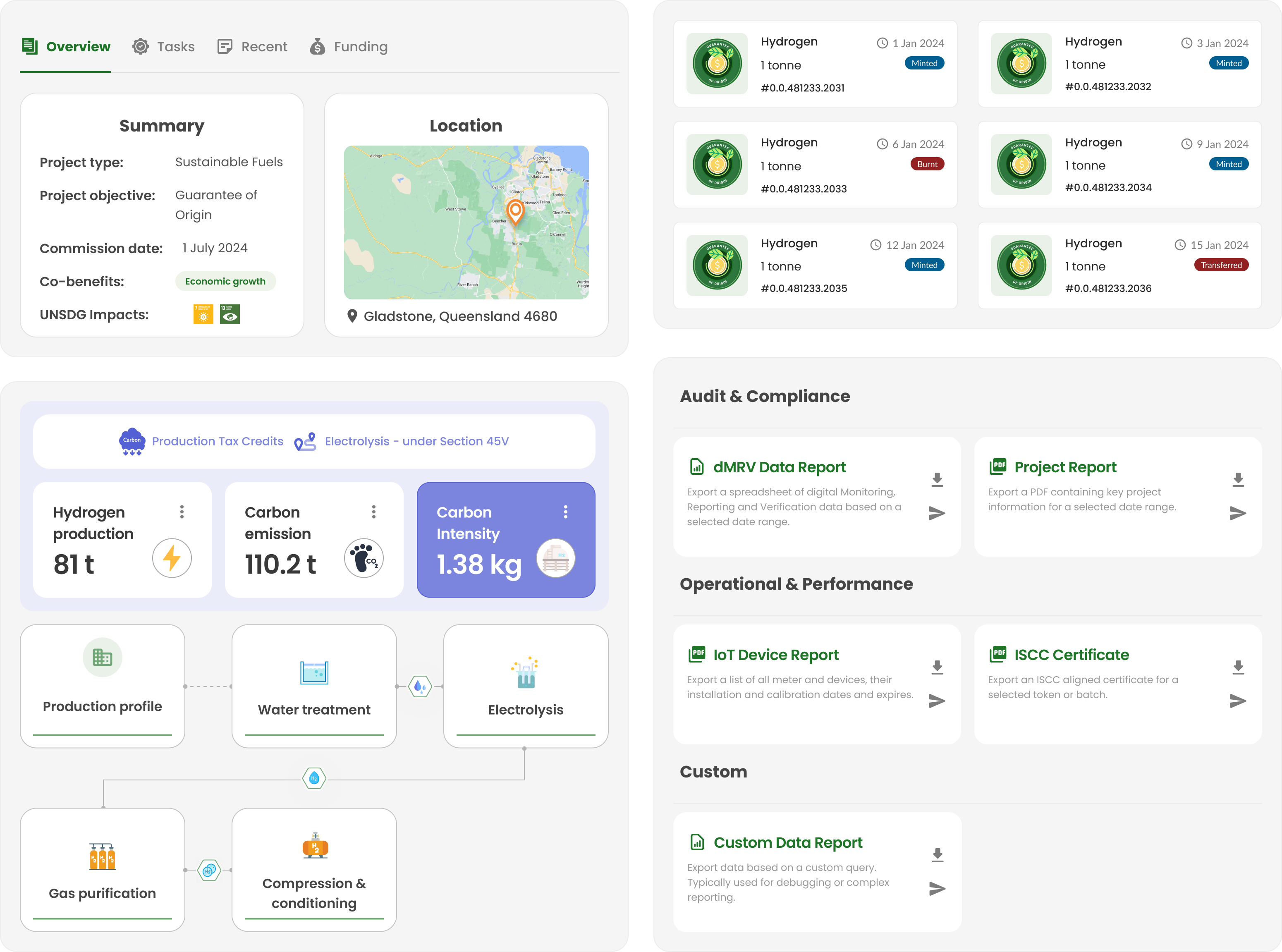
Carbon Central comes equipped with features such as project management tools (including task management and project updates), digital twins that allow businesses to simulate their operations before entering production, and the Carbon Central TrustChain which provides and immutable timeline of each unit of carbon produced or offset, or the production history of each unit of green fuel or resource.

<figure><img src="https://3509218582-files.gitbook.io/~/files/v0/b/gitbook-x-prod.appspot.com/o/spaces%2Ftq1CbjBmhXusa8UX3ZuU%2Fuploads%2F1nTWQrpffZwxFWrVA0hR%2Fimage.png?alt=media&amp;token=dbff5a96-62b0-4d3b-bab0-cac481cc577b" alt=""><figcaption></figcaption></figure>

<figure><img src="https://3509218582-files.gitbook.io/~/files/v0/b/gitbook-x-prod.appspot.com/o/spaces%2Ftq1CbjBmhXusa8UX3ZuU%2Fuploads%2FbhfaRWLVd69DEj1vpNWZ%2Fimage.png?alt=media&amp;token=92bd9937-f4bc-48de-9b52-ff2c38cf184e" alt=""><figcaption></figcaption></figure>

## Getting Started

Carbon Central was built with the industry experience gained while working with AMIC and the Safetytech Accelerator, Lloyd’s Register Maritime Decarbonisation Hub.&#x20;

To get started, check out our [Start Guide](/knowledge-base/getting-started/start-guide), or access one of our Use Cases for examples on how our existing customers use Carbon Central.

Watch: [Introducing Carbon Central (3-minute video)](https://eur01.safelinks.protection.outlook.com/?url=https%3A%2F%2Fwww.youtube.com%2Fwatch%3Fv%3DlhIpeAr3ts4\&data=05%7C02%7Ctyrone.ranatunga%40noviqtech.com%7C4947ae264ccf4753e64c08dcee6121ff%7C26c33a3228574cf2817e24744fc1ee61%7C0%7C0%7C638647348183479494%7CUnknown%7CTWFpbGZsb3d8eyJWIjoiMC4wLjAwMDAiLCJQIjoiV2luMzIiLCJBTiI6Ik1haWwiLCJXVCI6Mn0%3D%7C0%7C%7C%7C\&sdata=NoKcrQSeGINxq%2BFPAC%2FNPniFQ6UHlRHVpBDqORkCtTc%3D\&reserved=0)

## Staying in the loop

Carbon Central is in active development. You can stay up to date with our latest features by reading our [product updates blog](https://docs.carboncentral.app/product-updates/) here or by following our [socials](https://twitter.com/carboncentral_)

\
If you have any questions, feel free to chat with our support team via email (<support@carboncentral.app>)

## Discover more

Discover more about Carbon Central, developed by NoviqTech. Visit our resources for the latest updates:

* [NoviqTech Website](https://noviqtech.com/)
* [NoviqTech on Medium](https://medium.com/noviqtech)
* [NoviqTech on X](https://x.com/NoviqTech_)
* [NoviqTech on LinkedIn](https://www.linkedin.com/company/nvqtech)

<figure><img src="https://3509218582-files.gitbook.io/~/files/v0/b/gitbook-x-prod.appspot.com/o/spaces%2Ftq1CbjBmhXusa8UX3ZuU%2Fuploads%2F0uva2LrVHp83AxInUgTk%2Fimage.png?alt=media&amp;token=a256e960-daa1-4f37-8243-5734aa9b5cef" alt=""><figcaption></figcaption></figure>


# Start guide

A quick start guide to add your first project on Carbon Central

To get started, [sign up or sign in](https://carboncentral.app/) to your Carbon Central account.

### Step 1. Add your company

Click the "New Company" button. Then follow the steps to add your company name, logo, and choose your site name.  &#x20;

<figure><img src="https://3509218582-files.gitbook.io/~/files/v0/b/gitbook-x-prod.appspot.com/o/spaces%2Ftq1CbjBmhXusa8UX3ZuU%2Fuploads%2FBOzLr8Q5ar6HAunEimFV%2Fimage.png?alt=media&amp;token=4582c823-0cc8-4461-81e9-4b5f555988f6" alt=""><figcaption><p>Carbon Central - My Companies</p></figcaption></figure>

After adding your first company, click "Launch"

<figure><img src="https://3509218582-files.gitbook.io/~/files/v0/b/gitbook-x-prod.appspot.com/o/spaces%2Ftq1CbjBmhXusa8UX3ZuU%2Fuploads%2FxzOpDCJpekRuCEAmbb8M%2Fimage.png?alt=media&amp;token=d049222a-911e-4fc5-aab8-74643d23a12c" alt=""><figcaption><p>Carbon Central - My Companies</p></figcaption></figure>

### Step 2. Add your first project

Next, click the "Create Project" button. Then follow the steps to create your first project using the form.

<figure><img src="https://3509218582-files.gitbook.io/~/files/v0/b/gitbook-x-prod.appspot.com/o/spaces%2Ftq1CbjBmhXusa8UX3ZuU%2Fuploads%2FbmDMhF47KsZTnBICE8o3%2Fimage.png?alt=media&amp;token=6c42cfff-9712-4c29-a31f-ec9dc86d64f7" alt=""><figcaption><p>Carbon Central - My Projects</p></figcaption></figure>

After adding your first project, click "Launch"

<figure><img src="https://3509218582-files.gitbook.io/~/files/v0/b/gitbook-x-prod.appspot.com/o/spaces%2Ftq1CbjBmhXusa8UX3ZuU%2Fuploads%2FuZkYOVlbvKs8vwdLTsdc%2Fimage.png?alt=media&amp;token=de7a4c05-4d05-4326-ba53-dcacebcddf90" alt=""><figcaption></figcaption></figure>

### Step 3. Edit any additional project information

After adding your project, use the edit options to make changes to project data.

<figure><img src="https://3509218582-files.gitbook.io/~/files/v0/b/gitbook-x-prod.appspot.com/o/spaces%2Ftq1CbjBmhXusa8UX3ZuU%2Fuploads%2FKrno8mmC0zkVhV575bdR%2Fimage.png?alt=media&amp;token=36478eaf-f624-4656-94c2-1ec22a07ae2a" alt=""><figcaption></figcaption></figure>

{% hint style="success" %}
:tada: **Congratulations! You have successfully added your first project!** &#x20;
{% endhint %}


# Inviting a user to your company

A guide to add colleagues and stakeholders to your Carbon Central company.

Looking to join an existing company? Check our [Accepting an invitation to join a company](/knowledge-base/getting-started/accepting-an-invitation-to-join-a-company) steps.&#x20;

### Step 1. Log in to Carbon Central as a company owner

Make sure you are the owner of the company in Carbon Central. The company owner is the individual who initially created the company using the add company workflow.\
If you're unsure whether you are the owner, contact our support team at <support@carboncentral.app> for assistance.

### Step 2. Navigate to Manage Company

Once you've confirmed your ownership, log in to Carbon Central and ensure you have selected the correct company. Click on your profile icon located in the top right corner of the Carbon Central dashboard. From the dropdown menu, select "Manage company".

<figure><img src="https://3509218582-files.gitbook.io/~/files/v0/b/gitbook-x-prod.appspot.com/o/spaces%2Ftq1CbjBmhXusa8UX3ZuU%2Fuploads%2F127j0wZZ1FPBMBERzTjF%2Fimage.png?alt=media&amp;token=b7aad8df-cafa-4855-9d7d-5cafab0751f7" alt=""><figcaption></figcaption></figure>

### Step 3. Invite users via email

Within the manage company section, locate the "Add Member" option. Click on it and follow the form to invite your colleagues or stakeholders by entering their email addresses. They will receive an invitation to join the company on Carbon Central.

<figure><img src="https://3509218582-files.gitbook.io/~/files/v0/b/gitbook-x-prod.appspot.com/o/spaces%2Ftq1CbjBmhXusa8UX3ZuU%2Fuploads%2FQ1Hgnbg8cR2slBh8NefA%2Fimage.png?alt=media&amp;token=9d0b4ccb-8a4e-4a8d-8ba8-de677a8f7c4e" alt=""><figcaption></figcaption></figure>

{% hint style="info" %}
To keep track of your invitations, go to the "Invitations" tab at the top of the Manage Company section. Here, you can view the status of each invitation, whether it's pending, accepted, or declined. This feature helps you stay organized and ensures that everyone is seamlessly integrated into your Carbon Central workspace.
{% endhint %}

{% hint style="success" %}
:tada: **Congratulations! You've successfully invited users to join your company on Carbon Central.** \
If you encounter any issues or have further questions, feel free to reach out to our support team for assistance.
{% endhint %}


# Accepting an invitation to join a company

A guide to join a company on Carbon Central using an invitation

Looking to to invite users to your company? Check our [Inviting a user to your company](/knowledge-base/getting-started/inviting-a-user-to-your-company) steps.&#x20;

### Step 1. Check your inbox for an email invitation

Keep an eye on your inbox for an email from Carbon Central. Look for the "Join company" button within the email and proceed to the next step.

<div data-full-width="false"><figure><img src="https://3509218582-files.gitbook.io/~/files/v0/b/gitbook-x-prod.appspot.com/o/spaces%2Ftq1CbjBmhXusa8UX3ZuU%2Fuploads%2FQe03uyXLMvxogLFNWCj8%2Fimage.png?alt=media&amp;token=05cae1dd-2a31-4dff-ba35-fec03dc708ef" alt="" width="375"><figcaption></figcaption></figure></div>

### Step 2. Sign up or sign in

A) *New to Carbon Central?*

* Select the "Sign Up" option
* Follow the steps to sign up using the email which was invited.

B) *Already have an existing account on Carbon Central?*

* Ensure that the email for which you received the invitation is associated with your Carbon Central account.
* Sign in using your existing credentials.

<figure><img src="https://3509218582-files.gitbook.io/~/files/v0/b/gitbook-x-prod.appspot.com/o/spaces%2Ftq1CbjBmhXusa8UX3ZuU%2Fuploads%2FUqHaKaMcvOVoODDDNFjH%2Fimage.png?alt=media&amp;token=257c1fa1-ca6a-470b-ba69-53f6301907d6" alt="" width="375"><figcaption></figcaption></figure>

### Step 3. Accept the invitation

After successfully signing up or logging into your account, navigate to the Invitations section. Locate the invitation you received and use the "accept" option. This action will confirm your membership within the company on Carbon Central.

<figure><img src="https://3509218582-files.gitbook.io/~/files/v0/b/gitbook-x-prod.appspot.com/o/spaces%2Ftq1CbjBmhXusa8UX3ZuU%2Fuploads%2FHGktTSeQkpCFUwsVSuZA%2Fimage.png?alt=media&amp;token=9058d570-fbbe-44d1-aa82-22075ca361dc" alt=""><figcaption></figcaption></figure>

{% hint style="success" %}
:tada: **Congratulations! You have successfully joined a company!** &#x20;

If you encounter any difficulties or have questions, don't hesitate to reach out to our support team for assistance.
{% endhint %}


# Adding a digital twin

Digital twins are unique for each of your projects in Carbon Central. Be sure to have setup your first project by following our[ start guide.](/knowledge-base/getting-started/start-guide)

## 1. Add your digital twin

Carbon Central offers two methods for adding your digital twin: automatic and manual. Here's how each method works:

**Automatic Method**\
*Ideal for projects with real-time data from sensors in manufacturing plants or transportation fleets.*

Replicate automated processes by integrating meters from production facilities, vehicles, buildings, and more. Configure your twin with digital measurement, verification, and reporting (dMRV) data to automatically create carbon assets according to your selected standard and methodology.

**Manual Method**\
*Suitable for projects like forestry management, where data collection is periodic and&#x20;may not involve sensors.*

Map each step of your existing manual process, such as land management or forestry. Attach your methodology requirements, including manual reporting, audit reports, and other evidence, to your twin to create comprehensive evidence-based carbon assets for your selected standard.

<figure><img src="https://3509218582-files.gitbook.io/~/files/v0/b/gitbook-x-prod.appspot.com/o/spaces%2Ftq1CbjBmhXusa8UX3ZuU%2Fuploads%2FxZJJpGKP0kIA18us4roy%2Fimage.png?alt=media&amp;token=3d3afeae-03bf-4286-86e8-62369ed1b0a2" alt=""><figcaption><p>Digital twin setup landing page</p></figcaption></figure>

{% hint style="info" %}
If you're unsure which method to choose, select Manual for now. You can always switch between the two methods later on when configuring your token minting settings.
{% endhint %}

## 2. Select a template

To streamline your digital twin setup process, Carbon Central offers a selection of templates designed to assist you in creating your digital twin. These templates are pre-configured with the necessary manual file requirements and meters required to align with the standard and methodology you're using.

Choose the template that best fits your project's requirements to kickstart the establishment of your baseline digital twin.

<figure><img src="https://3509218582-files.gitbook.io/~/files/v0/b/gitbook-x-prod.appspot.com/o/spaces%2Ftq1CbjBmhXusa8UX3ZuU%2Fuploads%2FTTLkWJrjWDkq1h8hmgFB%2Fimage.png?alt=media&amp;token=dc969d15-fad8-48f6-b782-bd5b28855b12" alt=""><figcaption><p>Digital twin template selection form</p></figcaption></figure>

{% hint style="info" %}
If you find that none of the existing templates suit your project needs, please don't hesitate to contact our support team at <support@carboncentral.app>.&#x20;

We'll be happy to add support for a template tailored to your specific requirements.
{% endhint %}

## 3. Confirm your project eligibility

Various standards and methodologies have specific criteria that must be met for eligibility. These typically consist of a series of questions or requirements that need to be addressed. We request that you complete these eligibility criteria during the setup of your digital twin.

You have the option to skip these eligibility questions for now by selecting "continue." However, please note that you will need to provide this information before enabling tokenisation in the future.

<figure><img src="https://3509218582-files.gitbook.io/~/files/v0/b/gitbook-x-prod.appspot.com/o/spaces%2Ftq1CbjBmhXusa8UX3ZuU%2Fuploads%2F3FWzFmeBTT2rKjvSAE5R%2Fimage.png?alt=media&amp;token=b6b6c8b0-c64a-41d0-8ae1-518fa043811e" alt=""><figcaption><p>Digital twin methodology eligibility example</p></figcaption></figure>

## 4. View the template digital twin (template)

**Dashboard Blocks and Devices**

Once you've selected a template, it's time to review and identify the blocks and devices that are relevant to your project. Our templates are closely aligned with the selected Standard and Methodology.

For manual blocks, you can customise them by adding or removing required information/fields and document uploads.

For automated device blocks, you can customise them by configuring simulated meter values or integrating directly with your real meters.

{% hint style="info" %}
Please note that customising digital twins can be a complex activity. We recommend reaching out to our support team so we can help you customise and onboard your project for free.
{% endhint %}

## 5. Understanding your digital twin

Digital Twins are a core feature of Carbon Central, designed to align data capture with real-world processes. While Digital Twins are complex, they can be broken down into a few key components to help users understand their structure and functionality.

### Key components of a twin

The main Digital Twin tab provides an overview of its core components. At the top, the Digital Twin name appears alongside the batch selector, which lets users choose date ranges for viewing data.

The configure button opens the settings panel, where users can update minting details, adjust admin settings, and refine Digital Twin parameters.

<figure><img src="https://3509218582-files.gitbook.io/~/files/v0/b/gitbook-x-prod.appspot.com/o/spaces%2Ftq1CbjBmhXusa8UX3ZuU%2Fuploads%2FqAiEAOFBKu4chlc64RWd%2Fimage.png?alt=media&amp;token=cd44eefc-e08a-4cda-91b3-1a0eb1bcbdaa" alt=""><figcaption><p>Top section of a digital twin</p></figcaption></figure>

Below, the key metrics section allows users to set indicators like carbon intensity or total emissions.&#x20;

<figure><img src="https://3509218582-files.gitbook.io/~/files/v0/b/gitbook-x-prod.appspot.com/o/spaces%2Ftq1CbjBmhXusa8UX3ZuU%2Fuploads%2FS5Y8lgbUhXT50s1aTXHj%2Fimage.png?alt=media&amp;token=0029819e-eee3-4e6e-94be-d5ed93fc6ef5" alt=""><figcaption><p>Middle section of a digital twin (Key Metrics)</p></figcaption></figure>

The core workflow follows, mapping devices and process steps based on the selected template. The next sections explain how to configure these elements.

<figure><img src="https://3509218582-files.gitbook.io/~/files/v0/b/gitbook-x-prod.appspot.com/o/spaces%2Ftq1CbjBmhXusa8UX3ZuU%2Fuploads%2FPi31eJHJ4JJy7sOEcaWk%2Fimage.png?alt=media&amp;token=c91836c9-410c-490d-a3f9-7ec4dcc95c0e" alt=""><figcaption><p>Lower section of a digital twin (Core workflow)</p></figcaption></figure>

The Batch Management tab is located at the top of this page. This document will cover batch management in the following steps.

## 6. Digital twin configuration

### **Key metrics**

The Pencil Icon (1) allows you to adjust which metrics are highlighted on your dashboard. You can customise key indicators such as total production output, energy consumption, and emissions to align with your tracking needs. By entering relevant formulas using Digital Twin data, you can include a wide range of metrics.

<figure><img src="https://3509218582-files.gitbook.io/~/files/v0/b/gitbook-x-prod.appspot.com/o/spaces%2Ftq1CbjBmhXusa8UX3ZuU%2Fuploads%2FRkA4I9fMqPy1n9S0YmOI%2Fimage.png?alt=media&amp;token=bdb73824-6c68-46e6-980b-3d6b04f7874a" alt=""><figcaption></figcaption></figure>

### **Automated and manual blocks**

To modify a specific process step, click the ‘…’ (More Options) button (2 and 3) on any panel. For manual blocks, you can edit the form inputs to meet your company’s needs, including adding extra fields such as new evidence documents. For automated blocks, you can update key inputs like electricity and fuel consumption, material usage, or net CO₂ emissions. After making changes, click **Confirm** to save them.

### **Final configuration and minting**

Selecting Configure (4) unlocks the minting and tokenisation. View our next article [Getting ready for tokenisation](/knowledge-base/getting-started/getting-ready-for-tokenisation) for steps on moving your digital twin from edit mode, into live active minting mode.

## 7. Using batch management

Batches are used to store information relevant to a unique batch. This is commonly used to track and manage feedstock and storage of batches. These batches are also used to group automated data based on the start and end times entered.

<figure><img src="https://3509218582-files.gitbook.io/~/files/v0/b/gitbook-x-prod.appspot.com/o/spaces%2Ftq1CbjBmhXusa8UX3ZuU%2Fuploads%2FIIAjV7bvJAan3plDfkSK%2FBatch%20Hydrogen.png?alt=media&amp;token=bf16690a-bb7b-4d32-a2fe-a5162704fccb" alt=""><figcaption></figcaption></figure>

### Uploading manual documents and evidence

When a user selects 'Upload' on one of these blocks, they are presented with the option to upload evidence and input the necessary data required for token minting. This streamlined process ensures that users can easily provide the documentation and information needed to generate tokens accurately and efficiently.

<figure><img src="https://3509218582-files.gitbook.io/~/files/v0/b/gitbook-x-prod.appspot.com/o/spaces%2Ftq1CbjBmhXusa8UX3ZuU%2Fuploads%2FWopxOAVcqumagUIPl4xt%2Fimage.png?alt=media&amp;token=22dac283-712a-413d-9c75-d27b8fd02480" alt=""><figcaption><p>Digital twin manual information requirement example</p></figcaption></figure>

## 8. Detailed configuration

### Detailed: configuring automated devices (admin)

A crucial component of many methodologies involves recording and overseeing feedstock measurements obtained from meters. Through Carbon Central, project admins have the capability to seamlessly integrate their meters and utilise a mapping mechanism to align key fields from meter data with the expected fields for carbon credit calculation.&#x20;

All digital twin templates come equipped with a simulated meter, furnishing users with sample data for immediate utilisation. Subsequently, you can transition to your production meters when suitable by contacting us.

<figure><img src="https://3509218582-files.gitbook.io/~/files/v0/b/gitbook-x-prod.appspot.com/o/spaces%2Ftq1CbjBmhXusa8UX3ZuU%2Fuploads%2FEx2TzBhsAWf8DYlBkocP%2Fimage.png?alt=media&amp;token=d6ae0fca-03f9-4915-8c24-60c41d82a6de" alt="" width="375"><figcaption><p>Digital twin simulated meter configuration example</p></figcaption></figure>

### **Detailed: configuring manual information requirements (admin)**

Please contact our team to help configure manual information. User customisation of this information is coming in a future release.

{% hint style="success" %}
:tada: **Congratulations! Your digital twin is now ready to tokenise carbon assets!**\
Your next step will be to setup the tokenisation business rules and create your first testnet tokens.
{% endhint %}


# Getting ready for tokenisation

{% hint style="info" %}
🚧 Our tokenisation feature is still under development and testing 🚧
{% endhint %}

Here is a sneak peak!&#x20;

Tokenisation in Carbon Central is flexible and dynamic. We allow easy customisation to suit your specific needs. We support two main approaches to tokenisation (linked to your digital twin configuration):

1. **Manual Tokenisation**: This is used for standards/methodologies that require grouped or batch information such as a vintage year or production month. The batch finalisation block serves as the last step before tokenisation. It enables users to merge all data and information from their digital twin using a set of rules. Batch finalisation is utilised as the manual final approval prior to token minting and aggregates all data that has been stored on-chain using the digital twin into your tokens.
2. **Real-time Tokenisation**: Automatic tokenisation based on a set of business rules. For example, you can set a rule to "mint 1 guarantee of origin token for every kg of Hydrogen produced" based on meter data. Once set up, Carbon Central will continuously generate tokens using these business rules from digital twin data. In most cases, automated tokenisation will still require batch information (such as sources of electricity, co products, etc).  A batch finalisation block can be used to include additional information to tokens that were minted in real-time by linking up additional data.

<figure><img src="https://3509218582-files.gitbook.io/~/files/v0/b/gitbook-x-prod.appspot.com/o/spaces%2Ftq1CbjBmhXusa8UX3ZuU%2Fuploads%2FiWPy7wLwrF6oji03dEIX%2Fimage.png?alt=media&amp;token=5963e987-2eff-4772-8fca-7c2a7252580f" alt=""><figcaption></figcaption></figure>


# Upgrading to use paid features

**Unlock Premium Features with a Paid Subscription**

We're excited to have you onboard. While our platform offers a range of valuable features for free, some of the most powerful tools and capabilities require a paid subscription to access, enabling you to unlock the full potential of Carbon Central.

**Why Upgrade?**

By upgrading to a paid subscription, you gain access to an array of premium features including Tokenisation and Carbon Reporting. You also gain increased limits across our tools including increased projects, digital twins and users. Our paid subscription ensures you get the most out of Carbon Central.

### Contact us to discuss your subscription plan

<figure><img src="https://3509218582-files.gitbook.io/~/files/v0/b/gitbook-x-prod.appspot.com/o/spaces%2Ftq1CbjBmhXusa8UX3ZuU%2Fuploads%2FgbQcmW5u0tKt5pcdcfxw%2Fimage.png?alt=media&amp;token=774b5df4-9720-4051-aff2-078248e92cef" alt=""><figcaption></figcaption></figure>

## **Understanding Carbon Central Subscriptions:**

Carbon Central subscriptions are comprised of two components:

1. **Monthly Subscription Price:** Unlocking access to all premium features and limits.
2. **Tokenisation:** This component is charged on a per-usage basis, with pricing scaling to offer reduced rates with higher usage volumes. Tokenisation volumes reset monthly.

{% hint style="success" %}
:tada: **Congratulations! Your company has been upgraded!**
{% endhint %}

Manage your subscription easily through the provided options to update billing information, access invoices, or cancel if necessary.


# Carbon Central Use Cases

How to leverage Carbon Central and its dMRV tokenisation technology

Carbon Central gives project owners the tools required to centrally manage their carbon reporting, analytics and tokenisation. Using our powerful dMRV tokenisation technology, users can create high quality, transparent and trusted tokens.

[Guarantee of Origin](/knowledge-base/demos/guarantee-of-origin)

1. Renewable Energy Certificates (RECs, GOs, LGCs, STCs, etc.)&#x20;

[Trusted Tokenisation](/knowledge-base/demos/trusted-tokenisation-carbon-credits)

1. Offsets and Credits (ACCUs, CERs, ERUs, VCUs, GSOs, REDD+, etc.)&#x20;

[Carbon Reporting](/knowledge-base/demos/carbon-reporting)

1. Carbon Footprint/ Greenhouse Gas Accounting (GHG Protocol)&#x20;
2. Reports (ESG reporting such as GRI, TCFD, CSRD, etc.)&#x20;
3. Certification (NABERS, Green Building, etc)

\
\
\
\
\ <br>


# Guarantee of Origin

Create Guarantee of Origin certifications aligned with leading standards and methodologies including RECs, GOs, LGCs, STCs.

**Green Fuels**

Use Carbon Central to track the provenance of green fuels including hydrogen, ammonia, sustainable aviation fuel, and e-methanol for use across transportation industries.

[View our Green Hydrogen use case here](/knowledge-base/demos/guarantee-of-origin/green-hydrogen).

**Green Resources**

Use Carbon Central to prove the provenance of green resources such as iron ore, pig iron, steel, aluminium, and other raw minerals

**ISCC Mass Balance and Sustainability Declaration.**

Use Carbon Central to track food, feed, chemicals, plastics, packaging, textiles and renewable feedstock derived from a process using renewable energy sources . Create Sustainability Declaration (guarantee origin) certificates aligning to the ISCC Plus System.&#x20;

[View our Mass Balance use case here](/knowledge-base/demos/guarantee-of-origin/iscc-mass-balance).


# Green Hydrogen

Green Hydrogen Production Facility

This use case demonstrates a Green Hydrogen Production Facility that features a 10MW electrolysis system with a target output of 4 tonnes of hydrogen per day. The facility is equipped with essential supporting systems such as water treatment, hydrogen purification, and hydrogen compression. A 15MW solar array powers the site, supplemented by grid energy to ensure 24/7 production capability.

### Project Setup

The project onboarding process in Carbon Central begins with entering key information, including the location, expected lifetime value, and objectives. This foundational data helps establish the parameters necessary for project monitoring and generates background information for use in certificates.

### Digital Twin

Carbon Central provides a comprehensive library of digital twin templates, designed by environmental specialists. These templates encompass device data sources, manual reporting, and documentation needed to generate tokens according to Standard and Methodology guidelines. Users can customise the digital twin configuration via Carbon Central's Admin section to suit their project needs, ensuring adaptability and precision in the monitoring process.

<figure><img src="https://3509218582-files.gitbook.io/~/files/v0/b/gitbook-x-prod.appspot.com/o/spaces%2Ftq1CbjBmhXusa8UX3ZuU%2Fuploads%2FP3kW4H4EAm8BrvwgZtSI%2Fimage.png?alt=media&amp;token=98d55081-d9a9-486e-8e7a-686bd6a52985" alt=""><figcaption></figcaption></figure>

For this use case, digital twin blocks are configured to track key information related to the Product Profile and production devices. These blocks are essential for managing data about the hydrogen production process, providing real-time insights and metrics.

#### Configuring Devices

In Carbon Central, blocks are flexible components that allow data to be fed into the platform. Data can be sourced from a meter or simulated, enabling users to map key fields, such as water input and electricity usage. Each block is customisable, allowing users to define field names, icons, and units of measure.

<figure><img src="https://3509218582-files.gitbook.io/~/files/v0/b/gitbook-x-prod.appspot.com/o/spaces%2Ftq1CbjBmhXusa8UX3ZuU%2Fuploads%2FNYBAx8CSRPZGmTAZyezC%2Fimage.png?alt=media&amp;token=e05d7641-3ed5-44c6-8583-d581e336a1b9" alt=""><figcaption></figcaption></figure>

Once the data is captured, users can specify calculations to assess carbon emissions and other critical metrics across the digital twin. Calculations are essential to understanding the environmental impact of the production process, helping monitor performance over time.

<figure><img src="https://3509218582-files.gitbook.io/~/files/v0/b/gitbook-x-prod.appspot.com/o/spaces%2Ftq1CbjBmhXusa8UX3ZuU%2Fuploads%2FiRiW4CQ8dAeza9820W0j%2Fimage.png?alt=media&amp;token=b36b5b38-d477-4625-9a52-3b666e969851" alt=""><figcaption></figcaption></figure>

#### Uploading Documents and Evidence

Users can also upload manual data into the digital twin to support the tokenisation process. By selecting 'Upload' within a manual block, users can input the necessary data and upload supporting documents. These fields are determined by the project's specific standard and methodology. This ensures that documentation and information are aligned with token generation requirements, streamlining the process.

<figure><img src="https://3509218582-files.gitbook.io/~/files/v0/b/gitbook-x-prod.appspot.com/o/spaces%2Ftq1CbjBmhXusa8UX3ZuU%2Fuploads%2Fh27ZYuNiIUujlsQ146sv%2Fimage.png?alt=media&amp;token=14862fa8-2ecc-4a5a-8e8a-e4218a3412b8" alt=""><figcaption></figcaption></figure>

### Batch Management

Managing production data on a per-batch basis is a vital component of production processes. Carbon Central's Batch Management feature provides a flexible approach to handling batches of any date range. This flexibility allows users to manage, track, and finalise batch data with ease.

<figure><img src="https://3509218582-files.gitbook.io/~/files/v0/b/gitbook-x-prod.appspot.com/o/spaces%2Ftq1CbjBmhXusa8UX3ZuU%2Fuploads%2FIlclVhtLdvoPTtWJ3mDQ%2FBatch%20Hydrogen.png?alt=media&amp;token=96163b6f-5a08-47ad-a6e6-2d67f656241f" alt=""><figcaption></figcaption></figure>

#### Tagging Additional Information to a Batch

Once a tracking token has been created, users can add additional information to a batch, such as transport and storage details, to gain a full picture of emissions. This allows Carbon Central to adapt to dynamic production needs. Even after tokens are minted, batches can still be updated with new data, providing a complete and up-to-date emissions profile.

<figure><img src="https://3509218582-files.gitbook.io/~/files/v0/b/gitbook-x-prod.appspot.com/o/spaces%2Ftq1CbjBmhXusa8UX3ZuU%2Fuploads%2F6yaI67J52pYtQ4WJJPnx%2Fimage.png?alt=media&amp;token=d78b3ff7-5339-45ad-801f-ec695bdfd712" alt="" width="375"><figcaption></figcaption></figure>

### **Trust Chain**

After configuration, Carbon Central automatically generates tokens for each unit of product tracked, carbon emissions, or other metric tracked. All tokens can be viewed on the Trust Chain, which serves as a chronological audit trail of all project data, from onboarding to digital twin updates. The Trust Chain also enables independent review and verification of token origins, with all data sourced from blockchain-based records, including manual data and automated meter readings.

<figure><img src="https://3509218582-files.gitbook.io/~/files/v0/b/gitbook-x-prod.appspot.com/o/spaces%2Ftq1CbjBmhXusa8UX3ZuU%2Fuploads%2FPDruJRDb4uM2fvwRGAbw%2Fimage.png?alt=media&amp;token=c9c1d50c-78bf-44d4-b15d-644395f770bb" alt=""><figcaption></figcaption></figure>

For this hydrogen production, real-time tokenisation is enabled by Carbon Central, following predefined business rules. For example, users can configure rules such as "mint 1 guarantee of origin token for every kilogram of hydrogen produced," based on meter data. The platform continuously generates tokens from digital twin data, incorporating information like sources of electricity and co-products. A batch finalisation block can link additional data to tokens minted in real-time, ensuring a complete and accurate representation of the batch.

#### **Exporting Guarantee of Origin Certificate**

Once a batch is complete and all emissions data has been captured, users can export reports directly from Carbon Central’s on-chain data. These reports are customisable and can be shared with purchasers as a Guarantee of Origin or Sustainability Declaration Certificate, ensuring transparency and traceability across the production process.

<figure><img src="https://3509218582-files.gitbook.io/~/files/v0/b/gitbook-x-prod.appspot.com/o/spaces%2Ftq1CbjBmhXusa8UX3ZuU%2Fuploads%2FJP0QGyz5rcVgu4Lwe9es%2FFrame%20588.png?alt=media&amp;token=4a3df0bf-a299-4fd2-b1cf-c146c83a41c8" alt="" width="375"><figcaption></figcaption></figure>


# ISCC Mass Balance

This use case demonstrates the use of Carbon Central to track and manage the creation of Biodiesel from Hydrotreated Vegetable Oil (HVO). This example aligns with the ISCC Plus System to create a guarantee of origin token containing all information for a Sustainability Declaration Certificate. Through a seamless integration of manual documents, integration with external systems, and calculations, Carbon Central streamlines the process of tracking and managing this process while ensuring accuracy and compliance with ISCC Standard.

### Project Setup

Project information such as the location, expected lifetime value and objective are entered as part of the project onboarding into Carbon Central. This information allows users to establish the parameters of the project, used as background information in certificates

<figure><img src="https://3509218582-files.gitbook.io/~/files/v0/b/gitbook-x-prod.appspot.com/o/spaces%2Ftq1CbjBmhXusa8UX3ZuU%2Fuploads%2FosN1QLIfGGmcdiLb0Vr2%2Fimage.png?alt=media&amp;token=ddf2a62a-2504-4d0e-a0df-95b382490a9c" alt=""><figcaption></figcaption></figure>

### Digital Twin

Leveraging Carbon Central's library of digital twin templates crafted by our environmental specialists, users can kickstart their baseline digital twin. These templates typically encompass all necessary device data sources, as well as manual reporting and documentation elements essential for generating evidence tokens according to the Standard and Methodology guidelines. Furthermore, within Carbon Central's Admin section, users have the flexibility to customise their digital twins to suit their specific project requirements, ensuring adaptability and precision in monitoring and reporting processes.

<figure><img src="https://3509218582-files.gitbook.io/~/files/v0/b/gitbook-x-prod.appspot.com/o/spaces%2Ftq1CbjBmhXusa8UX3ZuU%2Fuploads%2FfXmlYHCLBWJAfh07kmwi%2Fimage.png?alt=media&amp;token=2776009a-40a2-48d7-b390-14720a392900" alt=""><figcaption></figcaption></figure>

In this example, two blocks of information are used to track information relating to the Product Profile, and the Fuel Supplier. Both are key to track and manage information about the production process. These blocks encompass the necessary data and documentation prescribed by the ISCC Plus method.

### Uploading Documents and Evidence

When a user selects 'Upload' on one of these blocks, they are presented with the option to upload evidence and input the necessary data required for token minting. This streamlined process ensures that users can easily provide the documentation and information needed to generate tokens accurately and efficiently.

<figure><img src="https://3509218582-files.gitbook.io/~/files/v0/b/gitbook-x-prod.appspot.com/o/spaces%2Ftq1CbjBmhXusa8UX3ZuU%2Fuploads%2F7VqXa9yB3F44bRMHGh0C%2Fimage.png?alt=media&amp;token=fd88ed05-2e20-4b55-a24d-927eb64b1b05" alt=""><figcaption><p>Production Profile information is set once, and then applies to all future data collected by this digital twin</p></figcaption></figure>

### Using Smart Fill

In some cases, information comes from suppliers in an email, pdf, or other document type. Using Carbon Central AI, we can identify, and match required data on behalf of the user. This is particularly useful for repeated processes, such as entering fuel supplier information from a sustainability declaration certificate.

### Configuring Batches

A crucial component of ISCC is managing data on a per-batch basis. To support this, the Batch Management feature in Carbon Central can be used. Its flexible approach to batches means users can manage batches of any date range.

<figure><img src="https://3509218582-files.gitbook.io/~/files/v0/b/gitbook-x-prod.appspot.com/o/spaces%2Ftq1CbjBmhXusa8UX3ZuU%2Fuploads%2F31jC72t7PeP3CoJ7CeGn%2Fimage.png?alt=media&amp;token=4d37fd1c-a806-41ad-be08-4ea30fe3bcf3" alt=""><figcaption></figcaption></figure>

### Attaching Batch Information

When a batch is finalised, key steps such as the transport to storage, and storage facility must be captured to ensure a complete view of carbon emissions can be captured. Using the batch blocks in Carbon Central, customers can enter key batch information using integrations with data sources, or manually. Integration to third party information can be achieved on for each filed required. Calculated fields can also be used to automatically fill information from other sources (these are coded as green text in Carbon Central). Calculations, such as calculating the distance, can be achieved by using other fields in the form.

<figure><img src="https://3509218582-files.gitbook.io/~/files/v0/b/gitbook-x-prod.appspot.com/o/spaces%2Ftq1CbjBmhXusa8UX3ZuU%2Fuploads%2FLhiKHdfvHjywUyE8MqEc%2Fimage.png?alt=media&amp;token=0b6f58dd-edd2-4e29-9943-0e4fce7ded3f" alt="" width="375"><figcaption></figcaption></figure>

### Tagging Additional Information to Token

Upon completion of a batch, tokens have already been minted, and can be viewed within the Trust Chain. Each source of data is visible on the Trust Chain including the project background, information on the digital twin such as fuel suppliers, and information in the batches such as transport and storage.

While all of this data is stored on the guarantee of origin certificate on blockchain, certain information required by the ISCC Plus method cannot be identified until a sale has been achieved. Using token tagging in Carbon Central gives users a way to attach this key additional information, and update the total emissions tracked for a batch.

<figure><img src="https://3509218582-files.gitbook.io/~/files/v0/b/gitbook-x-prod.appspot.com/o/spaces%2Ftq1CbjBmhXusa8UX3ZuU%2Fuploads%2F6yaI67J52pYtQ4WJJPnx%2Fimage.png?alt=media&amp;token=d78b3ff7-5339-45ad-801f-ec695bdfd712" alt="" width="375"><figcaption></figcaption></figure>

### **Exporting Sustainability Declaration Report**

Finally, now that complete emissions have been captured for a batch, users can export a set of reports directly from Carbon Central on-chain data. Reports can be customised, and in this case, we are exporting data required by the ISCC Plus Certificate template, which can be send to the purchaser of the product for use as the Sustainability Declaration.

<figure><img src="https://3509218582-files.gitbook.io/~/files/v0/b/gitbook-x-prod.appspot.com/o/spaces%2Ftq1CbjBmhXusa8UX3ZuU%2Fuploads%2FJgAafT8Nyycvm77y6PoM%2Fimage.png?alt=media&amp;token=90900d0a-ef0a-49a8-89e6-21620267e146" alt=""><figcaption></figcaption></figure>


# Trusted Tokenisation (carbon credits)

**C02 Removal Certificates (CORCs) using the Puro Standard Biochar Methodology**

Use Carbon Central to track your manual evidence, and directly integrate your biochar feedstock meters to create carbon credits aligned with the Puro Standard.&#x20;

[View our Biochar use case here.](/knowledge-base/demos/trusted-tokenisation-carbon-credits/biochar-from-sustainable-biomass)

**Renewable Energy Generation**

Use Carbon Central to track and produce carbon offset tokens from renewable energy generation such as wind and solar. Create carbon assets including offsets and credits aligned with ACCUs, CERs, ERUs, VCUs, GSOs, REDD+, etc.

[View our Rooftop solar use case here.](/knowledge-base/demos/trusted-tokenisation-carbon-credits/energy-certificates-from-rooftop-solar-production)

**Australian Carbon Credit Unit (ACCU) Scheme (formerly Emissions Reduction Fund)**

Use Carbon Central to create evidence tokens for your carbon credits using methodologies from the emissions reduction programs such fuel replacement from electric vehicles, savannah fire management, or soil carbon sequestration.


# Biochar from sustainable biomass

This use case demonstrates the use of Carbon Central to track and manage the carbon removal from the production and storage of Biochar. This example aligns with the Puro Standard Biochar Methodology V2 2022 to create evidence C02 Removal Certificates (evidence CORCs). Through a seamless integration of manual reporting, calculations, and automated data collection from feedstock meters, Carbon Central streamlines the process of tracking and managing carbon removal efforts, ensuring accuracy and compliance with industry standards.

### Biochar Project Setup

Project information such as the location, expected lifetime value and objective are entered as part of the project onboarding into Carbon Central. This information allows users to establish the parameters of their project as soon as they join Carbon Central.

<figure><img src="https://3509218582-files.gitbook.io/~/files/v0/b/gitbook-x-prod.appspot.com/o/spaces%2Ftq1CbjBmhXusa8UX3ZuU%2Fuploads%2Fbkq7HZvIFsXW7Tj3Y5r2%2Fimage.png?alt=media&amp;token=9acc8976-018f-43dc-9d16-14cf46d58a57" alt="" width="563"><figcaption></figcaption></figure>

### Digital Twin

Leveraging Carbon Central's library of digital twin templates crafted by our environmental specialists, users can kickstart their baseline digital twin. These templates typically encompass all necessary device data sources, as well as manual reporting and documentation elements essential for generating evidence tokens according to the Standard and Methodology guidelines. Furthermore, within Carbon Central's Admin section, users have the flexibility to customise their digital twins to suit their specific project requirements, ensuring adaptability and precision in monitoring and reporting processes.

<figure><img src="https://3509218582-files.gitbook.io/~/files/v0/b/gitbook-x-prod.appspot.com/o/spaces%2Ftq1CbjBmhXusa8UX3ZuU%2Fuploads%2F4pfqpZSK41vCCauuNoCh%2Fimage.png?alt=media&amp;token=279f9a34-76e8-4e79-9a67-dee50f12532c" alt="" width="563"><figcaption></figcaption></figure>

### Batch Management

In this example, three manual upload blocks are evident: Biomass Sourcing Evidence, Biochar Production Evidence, and Transport and Application of Biochar Evidence. Each block encompasses the necessary data and documentation prescribed by the chosen methodology, facilitating comprehensive tracking and verification of carbon removal activities at every stage of the process.

<figure><img src="https://3509218582-files.gitbook.io/~/files/v0/b/gitbook-x-prod.appspot.com/o/spaces%2Ftq1CbjBmhXusa8UX3ZuU%2Fuploads%2FH1kfWusZy7lrIeYU4gE7%2Fimage.png?alt=media&amp;token=db5e622c-6b4f-435c-95b4-5a6a5c0712a3" alt="" width="563"><figcaption></figcaption></figure>

### Uploading Manual Documents and Evidence

When a user selects 'Upload' on one of these blocks, they are presented with the option to upload evidence and input the necessary data required for token minting. This streamlined process ensures that users can easily provide the documentation and information needed to generate tokens accurately and efficiently.

<figure><img src="https://3509218582-files.gitbook.io/~/files/v0/b/gitbook-x-prod.appspot.com/o/spaces%2Ftq1CbjBmhXusa8UX3ZuU%2Fuploads%2FpISoy03qfUuto3JgRybK%2Fimage.png?alt=media&amp;token=e9424e57-9c01-4fea-9d7d-972e1d9d2e89" alt=""><figcaption></figcaption></figure>

### Configuring Automated Devices (admin)

A crucial component of many methodologies involves recording and overseeing feedstock measurements obtained from meters. Through Carbon Central, project admins have the capability to seamlessly integrate their meters and utilise a mapping mechanism to align key fields from meter data with the expected fields for carbon credit calculation. Additionally, all digital twin templates come equipped with a simulated meter, furnishing users with sample data for immediate utilisation. Subsequently, users can transition to their production meters as per their convenience and suitability.

<figure><img src="https://3509218582-files.gitbook.io/~/files/v0/b/gitbook-x-prod.appspot.com/o/spaces%2Ftq1CbjBmhXusa8UX3ZuU%2Fuploads%2FIjzWToFHYevrDrTsMTIb%2Fimage.png?alt=media&amp;token=a9ab0d93-679b-4373-af42-5d4208bd3c93" alt="" width="375"><figcaption></figcaption></figure>


# Energy certificates from rooftop solar production

The TROEF Dutch energy project leverages Carbon Central to track and verify carbon footprints as part of its mission to develop carbon-neutral cities. By connecting sustainable energy communities through the Internet of Energy, the project facilitates peer-to-peer energy and CO2 certificate trading. Carbon Central’s platform provides real-time monitoring and secure, auditable data storage on its Trust Chain.&#x20;

This use case demonstrates how Carbon Central supports TROEF’s goals of optimising energy use and driving the Netherlands towards a net-zero carbon future.

### Building Project Setup

For each building, project details such as location, expected lifetime value, and objectives are entered during onboarding into Carbon Central. This setup allows users to define their project parameters as soon as they join the platform.

<figure><img src="https://3509218582-files.gitbook.io/~/files/v0/b/gitbook-x-prod.appspot.com/o/spaces%2Ftq1CbjBmhXusa8UX3ZuU%2Fuploads%2FbC9TsourivgnIbpsddn6%2Fimage.png?alt=media&amp;token=42e90a38-fce5-45b4-8f80-7a4ad77f01f5" alt=""><figcaption></figcaption></figure>

### EnergyTag

This use case adheres to the EnergyTag standard, generating Granular Certificates from excess rooftop solar production. By integrating grid usage, solar output, and emissions factors, we calculate savings with near real-time Granular Certificates. During the initial setup, each building selects this as a standard template.

<figure><img src="https://3509218582-files.gitbook.io/~/files/v0/b/gitbook-x-prod.appspot.com/o/spaces%2Ftq1CbjBmhXusa8UX3ZuU%2Fuploads%2F05xfSVgiG92QoacxMD9h%2Fimage.png?alt=media&amp;token=db92f1e5-a03e-41e7-9812-52f9456cf95e" alt=""><figcaption></figcaption></figure>

### Digital Twin

Using the template, new projects can quickly be onboarded to establish a baseline digital twin. The template includes blocks necessary to integrate essential data sources, including grid usage, solar production/consumption, and emissions factors, along with manual reporting elements needed to generate evidence tokens according to the EnergyTag method. Additionally, users can customise their digital twins within Carbon Central's Admin section, ensuring flexibility and accuracy tailored to their specific project needs.

<figure><img src="https://3509218582-files.gitbook.io/~/files/v0/b/gitbook-x-prod.appspot.com/o/spaces%2Ftq1CbjBmhXusa8UX3ZuU%2Fuploads%2Fk5zkE5NmsN7npacKygPb%2Fimage.png?alt=media&amp;token=d98aefe5-c678-4baf-aafd-5bc048c0af29" alt=""><figcaption></figcaption></figure>

### Configuring Meters (admin)

The template comes preset with simulated meters for the required data, which can be replaced by integrating real data sources as projects progress. Project admins can seamlessly connect their meters through Carbon Central and use a mapping mechanism to align key fields from meter data with those needed for carbon credit calculations. This ensures accurate and efficient feedstock measurement and data integration, supporting reliable carbon reporting.

<figure><img src="https://3509218582-files.gitbook.io/~/files/v0/b/gitbook-x-prod.appspot.com/o/spaces%2Ftq1CbjBmhXusa8UX3ZuU%2Fuploads%2F2jFMtRj1F9OlrnOdjOEU%2Fimage.png?alt=media&amp;token=2f174fdb-e723-4ac0-8267-8424369649da" alt="" width="375"><figcaption></figcaption></figure>

### Uploading Device Configuration Evidence

Each meter's production profile must be configured within the digital twin. During the initial setup, users can select 'Upload' on a block to input necessary data, such as calibration certificates and key dates, and upload evidence. This streamlined process ensures that users can efficiently provide the required documentation, enabling accurate and timely token generation.

<figure><img src="https://3509218582-files.gitbook.io/~/files/v0/b/gitbook-x-prod.appspot.com/o/spaces%2Ftq1CbjBmhXusa8UX3ZuU%2Fuploads%2FSe2TBADsFel27QWCHPh3%2Fimage.png?alt=media&amp;token=292fe085-067f-4180-b2c5-2ddc7c74cf77" alt="" width="375"><figcaption></figcaption></figure>

### Granular Certificates

Once configuration is complete, Granular Certificates will be automatically generated for each excess watt-hour (Wh) of energy produced by the integrated solar panels. Tokens can be viewed on the TrustChain, which provides a chronological audit trail of all data entered into Carbon Central.

<figure><img src="https://3509218582-files.gitbook.io/~/files/v0/b/gitbook-x-prod.appspot.com/o/spaces%2Ftq1CbjBmhXusa8UX3ZuU%2Fuploads%2FY5uPf2G4EpACKEOFbVCP%2Fimage.png?alt=media&amp;token=2b7cd72c-888b-4398-b02b-d741af4decd0" alt=""><figcaption></figcaption></figure>

<figure><img src="https://3509218582-files.gitbook.io/~/files/v0/b/gitbook-x-prod.appspot.com/o/spaces%2Ftq1CbjBmhXusa8UX3ZuU%2Fuploads%2FleF4zofXIfa40dxaSJfj%2Fimage.png?alt=media&amp;token=0336e280-898f-4a4f-82b0-f7761645dadd" alt=""><figcaption></figcaption></figure>


# Carbon Reporting

**Carbon Footprint**

Use Carbon Central to track the carbon emissions for a building or campus using Greenhouse Gas Accounting (GHG Protocol). Integrate your meters directly to our platform to view realtime monitoring data. Our flexible digital twin feature adapts to your use case, allowing the calculation of the carbon footprint of any asset, building, or process.&#x20;

[View our GHG Protocol Corporate Standard use case here.](/knowledge-base/demos/carbon-reporting/ghg-protocol-corporate-standard)

**Reports**

Use Carbon Central to simplify ESG reporting. Our flexible reporting engine can help you to export data from the platform ready for reporting including GRI, TCFD, CSRD, etc.

**Certification**

Use Carbon Central to verify your emissions for certification. Integrate your data sources to Carbon Central, and export data to support certifications including NABERS, Green Building, etc


# GHG Protocol Corporate Standard

This use case demonstrates the use of Carbon Central to track and manage the carbon emissions from a corporate entity. In this example, we will look at examples of Scope 1, 2 and 3 emissions from NoviqTech - demonstrating how we track our company emissions using the GHG Protocol - Greenhouse Gas Accounting Standard.

### Digital Twin

Leveraging Carbon Central's library of digital twin templates crafted by our environmental specialists, users can kickstart their baseline GHG Corporate Standard digital twin. When calculating total emissions using the GHG accounting standard, it is key to understand each source of emissions across all scopes. To achieve this, our digital twins come fitted with emissions calculators which help users to enter the important information to calculate emissions.&#x20;

<figure><img src="https://3509218582-files.gitbook.io/~/files/v0/b/gitbook-x-prod.appspot.com/o/spaces%2Ftq1CbjBmhXusa8UX3ZuU%2Fuploads%2FCygOOarTRMx4J5nVClwr%2Fimage.png?alt=media&amp;token=cbea17d5-89ce-4269-a731-9b0542b2ad94" alt=""><figcaption></figcaption></figure>

Leveraging this template provides examples of all device data sources, as well as manual reporting and documentation elements essential for generating evidence tokens according to the Standard and Methodology guidelines.&#x20;

This demo shows three emissions calculators across each scope, and one area to manage and track any purchased offsets.

### Using the scope emissions calculator

When a user selects 'Upload' on one of these blocks, they are presented with the option to upload evidence and input the necessary data required for token minting. This streamlined process ensures that users can easily provide the documentation and information needed to generate tokens accurately and efficiently.

**Supported emissions sources**

All emissions sources can be accounted for in Carbon Central. We offer native support for common sources, and can easily add support for unique sources on request.&#x20;

Common examples include:

* mobile combustion for petrol or diesel company vehicles (scope 1),
* purchased energy for head office (scope 2); or
* purchased goods and services such as cloud services (scope 3).

**Example - Scope 1**

Here we can see the details required for an example scope 1 emissions calculation. A user has selected an emissions source and category, and proceeded to enter relevant metrics and emissions factors, along with the total calculated emission.&#x20;

In this scenario, we see that the emissions for a company car using mobile combustion (gasoline/petrol) is being calculated.

The user has entered the appropriate unit (L), usage (1000 L), and emissions factor (2.312) used in their calculation. Finally they entered the appropriate emissions for the year for a total of 2313 kg CO2e.

This value is now tracked and accounted for in the company's total emissions for the calculated period.

<figure><img src="https://3509218582-files.gitbook.io/~/files/v0/b/gitbook-x-prod.appspot.com/o/spaces%2Ftq1CbjBmhXusa8UX3ZuU%2Fuploads%2Fn1flaNfmtwULU4mnB2jK%2Fimage.png?alt=media&amp;token=85f3f347-3232-490b-a76d-be06369f1f55" alt=""><figcaption></figcaption></figure>

### Offsets

After total emissions are calculated, users can enter appropriate sources of purchased offsets. Offsets can be sourced from an appropriate location and entered into Carbon Central to be factored into the total emissions calculation.

In this example, we can see that Australian Carbon Credit Units were purchased, offsetting 10 t CO2e (10 credits were applied).

<figure><img src="https://3509218582-files.gitbook.io/~/files/v0/b/gitbook-x-prod.appspot.com/o/spaces%2Ftq1CbjBmhXusa8UX3ZuU%2Fuploads%2Fe40GsEQwY8fK9xqDxzx9%2Fimage.png?alt=media&amp;token=5ae0e4bd-ef59-4694-a197-df59226ac743" alt=""><figcaption></figcaption></figure>

### Total company emissions

After entering appropriate sources of scope 1, 2 and 3 emissions for the selected period, along with any purchased offsets, carbon emission tokens are minted aligned with the GHG Corporate Standard. For example, tokens can be minted aligned with the InterWork Alliance (IWA) Carbon Emission Token Protocol.

<br>


# FAQ's

Question isn't answered? Feel free to reach out to our support team any time using <support@carboncentral.app>

<details>

<summary>I've lost access to my account.</summary>

Not to worry! Most of the time you can regain access to your account using our password reset form. You can access this by using the "Forgot Password?" option on our sign in page.

Still need help? Contact our support team using <support@carboncentral.app>

</details>

<details>

<summary>What is the difference between testnet and live mode?</summary>

The testnet mode allows you to customise and test the digital twin for free, with transactions processed on Hedera’s test network. However, data may be reset periodically as this environment is used for testing purposes.

In live mode, you are migrated to Hedera’s mainnet, where transactions are fully operational and costs are charged based on usage. This mode provides permanent data and real-world integration.<br>

You will start in testnet mode and can migrate to live mode when you're ready for real-world operations.

</details>

<details>

<summary>My use case isn't documented.</summary>

Can't find information on your Carbon use case? Our product is evolving every day, support may be just around the corner.

Please add your use case to our feature request board using this link <https://carboncentral.canny.io/>

Alternatively, reach out to our team using <support@carboncentral.app> to discuss your use case and how Carbon Central can help.

</details>

<details>

<summary>What is the difference between the TYMLEZ Platform and Carbon Central?</summary>

Carbon Central is our new and improved product, built upon the TYMLEZ Platform foundation.

</details>

<details>

<summary>My company isn't creating carbon assets yet. How do I get started?</summary>

Our team of industry experts can help you understand the standards and methodologies suitable for your use case.

To get started, be sure to [sign up for a Carbon Central account](https://carboncentral.app/register), then contact our team using <support@carboncentral.app>.&#x20;

</details>

<details>

<summary>How do I request a new feature or submit an idea?</summary>

Carbon Central is continually improving and we would love to hear from you about your idea. &#x20;

Please submit your feature requests or ideas using this link <https://carboncentral.canny.io/>

Alternatively, reach out to our team using <support@carboncentral.app> so we can arrange a call.

</details>

<details>

<summary>Understanding Carbon Central Subscriptions</summary>

Carbon Central subscriptions are comprised of two components:

1. **Monthly Subscription Price:** Unlocking access to all premium features and limits.
2. **Tokenisation:** This component is charged on a per-usage basis, with pricing scaling to offer reduced rates with higher usage volumes. Tokenisation volumes reset monthly.

</details>


# Help

## Contact Us

If you have any questions about Carbon Central feel free to chat with our support team via email&#x20;

[**support@carboncentral.app**](mailto:support@carboncentral.app)

<div align="center"><figure><img src="https://3509218582-files.gitbook.io/~/files/v0/b/gitbook-x-prod.appspot.com/o/spaces%2Ftq1CbjBmhXusa8UX3ZuU%2Fuploads%2FCQhVpA8Kcbv6xJ4AcBNH%2Fimage.png?alt=media&amp;token=48421ffa-1a26-472f-ab5f-156590c8d8e1" alt="" width="375"><figcaption></figcaption></figure></div>

***

If you'd like to discuss any other matters, please feel free to contact us using the provided links below.

<table data-card-size="large" data-column-title-hidden data-view="cards"><thead><tr><th align="center"></th><th align="center"></th><th data-hidden data-card-cover data-type="files"></th></tr></thead><tbody><tr><td align="center"><img src="https://3509218582-files.gitbook.io/~/files/v0/b/gitbook-x-prod.appspot.com/o/spaces%2Ftq1CbjBmhXusa8UX3ZuU%2Fuploads%2FZOqLLIVBWpsJ3LXVGD3w%2Fimage.png?alt=media&amp;token=d1d2d70f-ca7d-4877-bc91-164bf148e586" alt="" data-size="original"></td><td align="center"><a href="https://www.noviqtech.com/#Contact">https://www.noviqtech.com/#Contact</a></td><td></td></tr></tbody></table>


# Download

Carbon Central documents available to download and view

## Brochure

For an overview of Carbon Central

{% file src="/files/1dJ8gUv9xhy1CuKIHE94" %}

## Product Detail

For a deeper dive into Carbon Central’s features&#x20;

{% file src="/files/lCTnzsDuTcLOC9jwWW7W" %}

## Case Studies

For detailed case studies of Carbon Central’s

{% file src="/files/U99x9XpHCAqptELLp4EJ" %}

{% hint style="info" %}
For more insights and guidance on using Carbon Central, read our latest articles on [Medium](https://medium.com/noviqtech).
{% endhint %}


